
A business trip may last three days. The expense reporting process can last three weeks.
Employees return with hotel invoices, flight receipts, meal bills, taxi charges, mileage records, and sometimes a confusing collection of screenshots and email confirmations. Finance teams then have to collect, verify, categorize, approve, and reimburse every expense while making sure it follows company policy.
For businesses with frequent travelers, this creates a familiar problem: employees spend time preparing reports, managers spend time approving them, and finance teams spend even more time correcting errors and chasing missing information.
The good news is that expense reporting for traveling teams does not have to depend on spreadsheets, paper receipts, or endless email follow-ups. With the right processes and an automated expense management system, businesses can simplify expense reporting, improve compliance, and gain better control over travel spending.
Why Expense Reporting Becomes Difficult for Traveling Teams
Travel expenses are rarely limited to one transaction. A single business trip may include:
- Flights and airport transfers
- Hotel accommodation
- Meals and client entertainment
- Local transportation
- Mileage and fuel
- Parking and toll charges
- Visa and travel-related fees
- Business purchases made during the trip
When employees handle these expenses manually, information is often scattered across different places. Receipts may be stored in email inboxes, mobile galleries, paper folders, or messaging apps.
This creates several problems for finance teams:
Delayed expense submissions
Travelers may wait until the end of the month to submit expenses. By then, receipts can be missing, transaction details may be difficult to remember, and finance teams have less visibility into recent business spending.
Manual data entry
Entering every receipt manually takes time and increases the risk of errors. A small mistake in the amount, date, category, or tax information can create additional work during review.
Complicated approval workflows
A travel expense may need approval from a manager, department head, project owner, or finance team. Without automated routing, approval requests can become difficult to track.
Limited visibility into travel spending
When expense data is spread across spreadsheets and disconnected systems, it becomes difficult to answer important questions:
- How much is each team spending on business travel?
- Which departments are exceeding their budgets?
- Which travel categories are increasing?
- How much is being spent outside company policy?
Modern travel and expense management platforms address these challenges by bringing expense capture, policy controls, approvals, reporting, and financial visibility into a connected workflow.
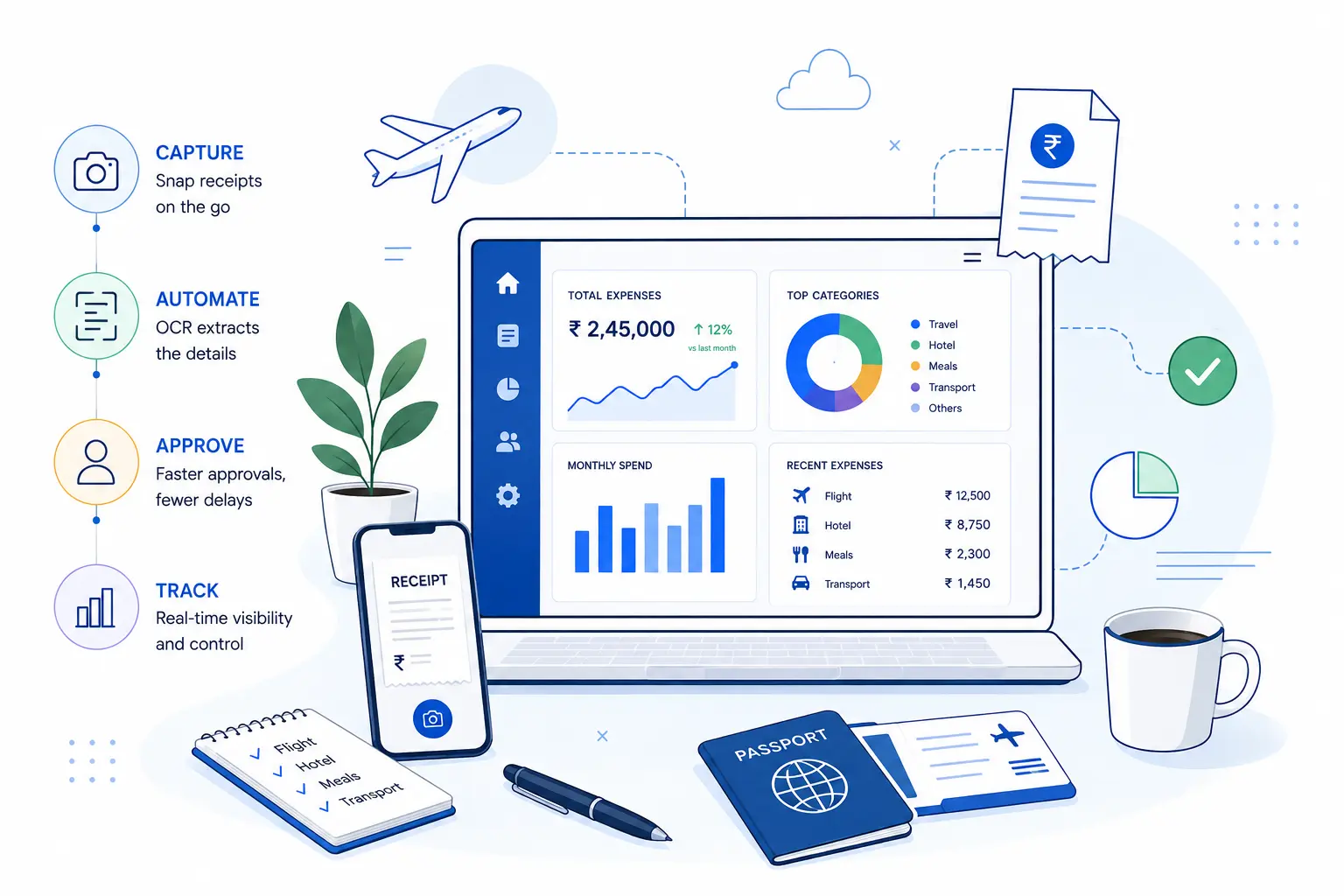
1. Capture Expenses at the Moment They Happen
The simplest way to improve expense reporting is to reduce the amount of work employees have to do later.
Instead of asking traveling employees to collect every receipt and enter the details manually at the end of a trip, businesses can provide tools that allow them to capture expenses immediately.
For example, an employee can:
- Take a photo of a receipt.
- Upload it through a mobile app.
- Automatically extract key information such as the merchant, date, amount, and tax details.
- Categorize the expense.
- Submit it for approval.
This approach reduces the risk of lost receipts and eliminates the need to recreate an entire trip from memory.
Why mobile receipt capture matters
Traveling employees are often working between airports, hotels, client meetings, and different cities. Expense reporting tools should work wherever employees work.
A mobile-first process makes it easier to submit expenses immediately rather than waiting until the employee returns to the office.
2. Use OCR to Reduce Manual Data Entry
One of the most valuable features in modern expense management software is Optical Character Recognition, commonly known as OCR.
OCR technology can read information from receipts and invoices and convert it into usable expense data. This means employees do not have to manually enter every detail.
For finance teams, this can help reduce:
- Data entry errors
- Processing time
- Missing information
- Repetitive administrative work
The most effective systems combine receipt capture with automated expense categorization and validation. This allows the platform to identify potential issues before a claim reaches the final approval stage.
For example, the system may identify that:
- A receipt is missing
- An expense exceeds a policy limit
- The same receipt has already been submitted
- A transaction is assigned to the wrong category
The result is a faster and more consistent expense reporting process.
3. Connect Travel Data With Expense Data
One of the biggest opportunities for businesses with traveling teams is connecting travel booking information with expense reporting.
When flight, hotel, and other travel information is stored separately from expense data, employees and finance teams often have to manually connect the two.
An integrated travel and expense management workflow can provide a clearer picture of the entire trip.
For example:
Before the trip: The employee requests travel and receives approval.
During the trip: Travel expenses and receipts are captured as they occur.
After the trip: Expenses are automatically matched with the relevant trip, categorized, reviewed, and submitted for approval.
This reduces duplicate data entry and gives finance teams better visibility into planned and actual travel spending.
Leading travel and expense platforms increasingly focus on connecting booking, expense submission, policy enforcement, and reporting in one workflow.
4. Automate Approval Workflows
Manual approvals are a common reason expense reimbursements get delayed.
An employee may submit a claim, but the approver may be unavailable, the email may be missed, or the claim may be sent to the wrong person.
An automated approval workflow can route expenses based on rules such as:
- Department
- Employee
- Expense amount
- Project
- Location
- Cost center
- Expense category
For example, a meal expense below a certain limit may require manager approval, while a high-value travel expense may require additional finance approval.
This allows businesses to create a consistent approval process without forcing finance teams to manually monitor every claim.
The goal is not to remove human review
Automation should not mean that every decision is made without people. Instead, it should ensure that routine expenses move quickly while exceptions receive the attention they need.
That is one of the key differences between simply digitizing expense reporting and creating a truly automated finance workflow.
5. Build Travel Policies Into the Expense Process
A travel policy is only useful when employees can easily follow it and businesses can consistently enforce it.
Many companies still rely on employees to remember rules related to:
- Hotel limits
- Meal allowances
- Flight classes
- Mileage rates
- Advance requirements
- Entertainment expenses
- Required receipts
A modern expense system can turn these policies into automated controls.
For example, it can flag an expense when:
- The amount exceeds the permitted limit
- A receipt is missing
- The expense falls outside the approved travel dates
- A category requires additional approval
This helps finance teams move from correcting policy violations after submission to preventing many issues earlier in the process.
6. Improve Reconciliation and Financial Accuracy
Expense reporting does not end when a manager clicks “Approve.”
Finance teams still need to reconcile expenses, verify transactions, assign accounting codes, and prepare information for financial reporting.
This is where disconnected systems can create additional work.
The best corporate finance automation tool should help connect expense data with the broader financial workflow. Depending on the company’s systems, this may include integration with accounting software, ERP platforms, corporate cards, payroll systems, and other financial tools.
A connected workflow can help reduce:
- Duplicate data entry
- Reconciliation delays
- Manual spreadsheet work
- Incorrect accounting classifications
Before choosing a platform, businesses should check whether it integrates with their existing finance technology rather than treating expense management as an isolated tool.
7. Give Finance Teams Real-Time Visibility
A monthly spreadsheet is not enough for businesses with frequent travel activity.
Finance leaders need to understand spending while it is happening, not weeks after the money has already been spent.
Expense analytics can help businesses monitor:
- Total travel expenditure
- Department-wise spending
- Employee spending
- Project expenses
- Policy violations
- Reimbursement trends
- Travel category costs
This information can help finance teams identify patterns and make better decisions.
For example, analytics may reveal that one department is consistently spending more on last-minute bookings or that a particular travel category is increasing faster than expected.
The value of expense automation is not only faster reporting. It is the ability to turn expense data into useful financial insight.
What Should Businesses Look for in an Expense Management Platform?
Choosing the best corporate finance tool depends on the company’s size, travel volume, existing systems, and financial processes.
However, businesses should generally look for:
Easy receipt capture
Employees should be able to submit receipts quickly from mobile or desktop devices.
OCR and automated data extraction
The platform should reduce manual entry by extracting important information from receipts and invoices.
Custom approval workflows
Different departments and spending levels may require different approval rules.
Policy enforcement
The system should identify out-of-policy expenses and provide clear visibility into exceptions.
Accounting and ERP integrations
Expense data should connect with the company’s existing financial systems.
Real-time reporting
Finance teams should be able to view current spending rather than waiting for month-end reports.
Strong user adoption
Even a feature-rich platform will not deliver results if employees find it difficult to use.
The best corporate finance automation tool is often the one that combines strong financial controls with a simple experience for employees.
A Practical Way to Start Automating Expense Reporting
Businesses do not need to automate every financial process at once.
A practical implementation can begin with a few high-impact steps:
Step 1: Map the current process
Document how an employee currently submits a travel expense, how it gets approved, and how finance processes it.
Step 2: Identify the biggest delays
Look for repeated manual tasks such as receipt collection, data entry, approval follow-ups, and reconciliation.
Step 3: Create clear expense policies
Make sure employees understand what is allowed, what requires approval, and what documentation is required.
Step 4: Automate repetitive tasks first
Start with receipt capture, OCR, expense categorization, approval routing, and reporting.
Step 5: Measure the results
Track metrics such as:
- Average expense processing time
- Approval turnaround time
- Reimbursement time
- Number of policy violations
- Manual finance hours
- Percentage of expenses submitted digitally
This makes it easier to measure the value of the new system and identify further opportunities for improvement.
The Future of Expense Reporting Is More Connected
Traveling teams need flexibility. Finance teams need control. Businesses need both.
The right expense reporting process brings these needs together by allowing employees to submit expenses quickly while giving finance teams the tools to enforce policies, automate approvals, and understand spending in real time.
Instead of treating expense reports as paperwork that must be processed after a trip, businesses can create a connected workflow that starts before travel and continues through reimbursement and financial reporting.
That is where expense management automation becomes more than an administrative tool. It becomes part of a smarter corporate finance operation.
Frequently Asked Questions
How can businesses simplify travel expense reporting?
Businesses can simplify travel expense reporting by using mobile receipt capture, OCR, automated expense categorization, policy controls, approval workflows, and integrations with accounting or ERP systems. Connecting travel booking data with expense data can further reduce manual entry.
What is the best way to manage employee travel expenses?
The best approach is to use a structured travel and expense management process. Employees should be able to capture expenses during the trip, while finance teams should have automated controls for policy compliance, approvals, reimbursement, and reporting.
What is a corporate finance automation tool?
A corporate finance automation tool helps businesses automate repetitive financial processes such as expense reporting, approvals, reconciliation, reporting, and financial data management. The right tool can reduce manual work while improving visibility and control.
How does OCR help with expense management?
OCR extracts information from receipts and invoices, such as merchant names, dates, amounts, and tax details. This reduces manual data entry and can help improve the speed and accuracy of expense processing.
How can companies improve expense policy compliance?
Companies can improve compliance by making policies clear and building them directly into the expense workflow. Automated systems can flag expenses that exceed limits, lack required documentation, or fall outside approved rules.
What should businesses consider when choosing the best corporate finance automation tool?
Businesses should consider ease of use, receipt capture, OCR capabilities, approval workflows, policy controls, reporting, integrations, security, scalability, and employee adoption. A tool should fit the company’s existing finance processes rather than create another disconnected system.
Simplify Expense Reporting With ExpenseOut
Traveling employees should be focused on business, not collecting receipts and completing complicated expense forms. Finance teams should be analyzing spending, not spending hours chasing missing information.
ExpenseOut helps businesses streamline expense reporting with automated receipt capture, expense workflows, approvals, policy controls, and better visibility into business spending.
If your company is still managing travel expenses through spreadsheets, email, and manual follow-ups, now is the time to modernize the process.
Book a Demo Today and discover how ExpenseOut can help your business simplify expense reporting, improve financial control, and automate everyday expense management.